Brother MFC-T930DW Ink Tank
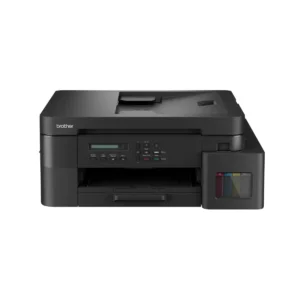
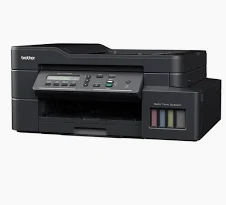
The Brother MFC-T930DW Ink Tank is a high-performance all-in-one inkjet printer tailored for home and small offices needing cost-efficient, professional-grade color printing, scanning, copying, and faxing. With print speeds of 17 ipm (mono) and 16 ipm (color), a 20-sheet ADF, and ultra-high-yield ink tanks, it ensures reliable, high-volume output. It offers a 230-sheet capacity (150-sheet tray plus 80-sheet multi-purpose tray), automatic duplex printing, and versatile connectivity via USB, Wi-Fi, Ethernet, and mobile apps like Brother Mobile Connect, AirPrint, and Mopria. The 1.8″ color LCD enhances usability, though some users report a steep learning curve and occasional paper feed issues, per Amazon.ae and Yugatech. Its compact design and low cost per page make it a top choice for efficient, budget-friendly workflows.
Key Features of the Brother MFC-T930DW Ink Tank
Ultra-High-Yield Ink Tank System
The MFC-T930DW uses BTD100BK (black) and BTD100 C/M/Y (color) ink bottles, yielding up to 15,000 pages (black, with two bottles) and 5,000 pages (color) per Brother’s ISO/IEC 24712 methodology. Its 1200×2400 dpi print resolution delivers sharp text and vibrant graphics for reports, brochures, or photos. The front-access ink tank with spill-proof nozzles ensures mess-free refills. The included ink set (two black, one each C/M/Y) supports immediate printing, minimizing setup costs.
Fast Printing and Automatic Duplex
With print speeds of 17 ipm (mono) and 16 ipm (color) per ISO/IEC 24734, and a first printout time of ~6 seconds, the printer ensures quick delivery. Fast mode reaches 30/26 ppm (mono/color), ideal for high-volume tasks. Automatic duplex printing saves paper, though duplex scanning requires manual flipping, a limitation noted on TechRadar. Some users report 30-40 second delays for back-page printing.
Wireless, Ethernet, and ADF Functionality
The printer supports USB 2.0, Ethernet (10Base-T/100Base-TX), Wi-Fi (IEEE 802.11a/b/g/n), and Wi-Fi Direct, enabling seamless printing via Brother Mobile Connect, AirPrint, or Mopria. The 20-sheet ADF handles multi-page scanning (1200×600 dpi) and copying (1200×600 dpi), with scan speeds varying from 10-80 seconds. The 1.8″ color LCD simplifies navigation, but its interface can be complex for beginners. Direct USB flash drive printing adds convenience.
Use Cases for the Brother MFC-T930DW Ink Tank
Home Office Productivity
Ideal for home offices printing up to 1,500 pages monthly, the MFC-T930DW handles invoices, contracts, or study materials efficiently. The 230-sheet capacity (150-sheet tray plus 80-sheet multi-purpose tray) supports various media, including plain, inkjet, glossy, and recycled paper (60-163 g/m²). Its compact design and low cost per page are praised, though occasional paper jams in the ADF or multi-purpose tray require manual clearing. The 20-sheet ADF streamlines multi-page tasks, enhancing productivity for remote workers.
Small Business Efficiency
For small businesses, the printer supports a 50,000-page machine life or 5-year warranty, handling high-volume tasks like reports or forms. The ADF, duplex printing, and Ethernet connectivity ensure stable network sharing, per Brother Gulf. Fax functionality (33.6 Kbps modem) supports quick document transfers, ideal for offices managing legal or administrative documents. Users note reliable performance but occasional “wrong paper type” errors, requiring tray adjustments.
Photo and Creative Printing
With 1200×2400 dpi and borderless printing, the printer supports photo prints (4″x6″ to A4) for posters, flyers, or marketing materials. Dye-based inks deliver vibrant colors, though quality may not match premium inkjets like the Epson L1800, per Flipkart. The 80-sheet multi-purpose tray handles glossy or thicker media, adding versatility for creative projects. Users appreciate its photo output for small-scale projects, though heavy photo printing may increase ink consumption.
Scanning, Copying, and Faxing
The flatbed scanner offers 1200×600 dpi for detailed scans, with an interpolated resolution of 19,200×19,200 dpi (Windows only). The 20-sheet ADF supports multi-page tasks, with copy features including up to 99 copies and 25%-400% scaling. Faxing includes PC-Fax and 200 speed dials, ideal for offices. Scanning speeds vary (10-80 seconds), and the lack of auto-duplex scanning is a drawback, per Brother India. Users report clear scans but occasional ADF jams, per Flipkart.
Compatibility of the Brother MFC-T930DW Ink Tank
Device Connectivity
The printer supports USB 2.0, Ethernet, Wi-Fi, and Wi-Fi Direct, compatible with Windows (7 SP1, 8, 10, Server 2008/2012/2016/2019), macOS (10.13.6 to 10.15.x via AirPrint or iPrint&Scan), Linux, and Chrome OS. It uses BTD100BK (black, 15,000 pages with two bottles) and BTD100 C/M/Y (5,000 pages each). Mac printing requires PDF/JPG formats via iPrint&Scan. Wi-Fi setup can be complex, requiring USB assistance in some cases.
Workspace Integration
Measuring 435x418x180 mm and weighing 9.6 kg, the printer fits compact workspaces, per PinkleHub. The covered 150-sheet tray and 80-sheet multi-purpose tray protect paper from dust and moisture, ensuring reliable prints. Integration with Brother Mobile Connect and cloud services like Google Drive enhances remote printing. The 128 MB memory handles complex jobs, though heavy network use may cause delays, per Amazon.ae.
Energy and Compliance Standards
With a power consumption of 0.1W (off), 0.9W (sleep), and 21W (printing), it meets Energy Star standards. TÜV-certified inks ensure safety, and a 5-year/50,000-page warranty (select regions, e.g., South Africa) or 3-year/30,000-page warranty (e.g., Singapore) provides reliability. Sustainable cardboard packaging reduces environmental impact.
Technical Specifications of the Brother MFC-T930DW Ink Tank
- Printer Type: Inkjet with Refillable Ink Tank
- Functions: Print, Scan, Copy, Fax
- Print Resolution: Up to 1200×2400 dpi (Windows), 1200×1200 dpi (macOS)
- Scan Resolution: 1200×600 dpi (flatbed), 19,200×19,200 dpi (interpolated, Windows only)
- Print Speed: 17 ipm (mono), 16 ipm (color); 30/26 ppm (fast mode)
- First Printout Time: ~6 seconds (mono), ~6.5 seconds (color)
- Paper Sizes: A4, Letter, Legal, Mexico Legal, India Legal, Folio, Executive, B5 (JIS), A5, B6 (JIS), A6, Photo (4″x6″, 3.5″x5″, 5″x7″), Index Card (5″x8″), C5 Envelope, Com-10, DL Envelope, Monarch
- Paper Handling: 150-sheet tray, 80-sheet multi-purpose tray, 50-sheet output, 20-sheet ADF
- Paper Types: Plain, Inkjet (coated), Glossy, Recycled (60-163 g/m²)
- Connectivity: USB 2.0, Ethernet (10Base-T/100Base-TX), Wi-Fi (IEEE 802.11a/b/g/n), Wi-Fi Direct
- Security Protocols: WEP 64/128bit, WPA-PSK (TKIP/AES), WPA2-PSK (TKIP/AES), WPA3-SAE (AES)
- Ink Yield: 15,000 pages (black, 2 bottles), 5,000 pages (color, C/M/Y)
- Display: 1.8″ color LCD
- Memory: 128 MB
- Fax Features: 33.6 Kbps modem, 200 speed dials, PC-Fax
- Copy Features: Up to 99 copies, 25%-400% scaling
- Dimensions: 435 mm x 418 mm x 180 mm
- Weight: 9.6 kg
- Power Consumption: 0.1W (off), 0.9W (sleep), 21W (printing)
- Power Supply: AC 100-240V, 50/60 Hz
- Warranty: 5-year/50,000-page carry-in (select regions, e.g., South Africa); 3-year/30,000-page (e.g., Singapore)
- In-Box: Printer, USB cable, power cord, ink bottles (2x BTD100BK, 1x BTD100 C/M/Y), manual, software (Windows), quick setup guide
Trust and Support with Aiconic Computers
Choosing the MFC-T930DW Ink Tank from Aiconic Computers ensures quality and reliable service. Backed by a 5-year/50,000-page warranty in select regions (e.g., South Africa) or 3-year/30,000-page warranty (e.g., Singapore), our support team assists with setup, Wi-Fi troubleshooting, or ink refills. The included USB cable, power cord, and ink bottles (two black, one each C/M/Y) enable immediate use. Users praise its vibrant prints and ink efficiency, though some report paper jams in the ADF, requiring manual clearing. Explore our range of printers for additional solutions to enhance your workspace.
Why Choose the Brother MFC-T930DW Ink Tank Printer?
The MFC-T930DW Ink Tank offers cost-efficient, high-volume printing, scanning, copying, and faxing with wireless, duplex, and ADF features for home and small offices. Despite occasional paper jams and a complex interface for some users. its ultra-high-yield inks (15,000 black/5,000 color pages), 1200×2400 dpi prints, and compact design make it a top choice for reliable, budget-friendly workflows. Its fax functionality and robust connectivity further enhance its versatility.


 Boda delivery



Reviews
Clear filtersThere are no reviews yet.