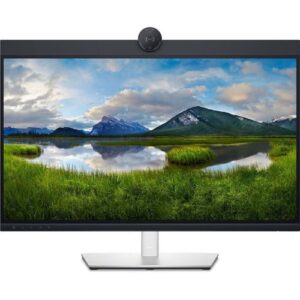
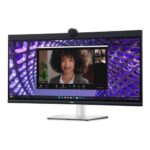
Dell 34-inch Curved Video Conferencing Monitor – P3424WEB, 34″ WQHD IPS Curved, 2K QHD Webcam, Dual 5W Speakers, Windows 11 Compatible, Black
The Dell 34-inch Curved Video Conferencing Monitor (P3424WEB) is a 34-inch ultrawide WQHD (3440×1440) curved IPS monitor designed for immersive collaboration, perfect for remote workers, hybrid teams, and professionals. Equipped with a 4MP 2K QHD webcam featuring a Sony STARVIS sensor, dual 5W speakers, and echo-canceling microphones, it’s certified for Microsoft Teams and Zoom. Extensive connectivity includes USB-C with 90W power delivery, HDMI, DisplayPort, and RJ45 Ethernet for streamlined productivity. With ComfortView Plus for low blue light, ergonomic adjustments, and eco-friendly materials, this monitor is ideal for modern workspaces. Discover this advanced solution at Dell USA or Aiconic Computers.
Versatile Use Cases for Dell 34-inch Curved Video Conferencing Monitor
Remote Work and Video Conferencing
The Dell 34-inch Curved Video Conferencing Monitor excels in virtual meetings with its 4MP 2K QHD webcam (30 fps, FHD at 60 fps), offering AI Auto Framing, temporal (3D), and spatial (2D) noise reduction for clear visuals in low light. Dual echo-canceling microphones and 5W speakers provide immersive audio, certified for Zoom and Teams. Features like Dell Express Sign-in with Windows Hello and a proximity sensor ensure fast, secure logins, while a manual webcam shutter and mute button enhance privacy. Explore productivity tools at Aiconic Computers’ software category.
Office Productivity and Multitasking
The 34-inch WQHD (3440×1440) curved IPS display with 99% sRGB and 3800R curvature minimizes eye movement, boosting focus for multitasking. The USB-C port delivers 90W power, data, and video via a single cable, reducing clutter. Auto KVM enables seamless control of two PCs with one keyboard and mouse, and DisplayPort-out supports daisy-chaining for dual-monitor setups. Dell Easy Arrange optimizes window management for enhanced productivity. Find accessories at Aiconic Computers’ accessories category.
Multimedia and Presentations
With 300 cd/m² brightness, a 1000:1 contrast ratio, and a 5ms response time, the monitor delivers sharp visuals for presentations or streaming. The dual 5W speakers ensure clear audio for virtual events, and the 21:9 ultrawide aspect ratio provides ample screen space for creative tasks or spreadsheets. HDMI and DisplayPort inputs support external devices, enhancing versatility. Discover more monitors at Aiconic Computers’ laptops category.
Sustainable and Ergonomic Workspaces
The Dell 34-inch Curved Video Conferencing Monitor uses 85% post-consumer recycled plastic and 90% recycled aluminum, meeting ENERGY STAR, TCO Certified Edge, and EPEAT Gold standards. ComfortView Plus reduces blue light without compromising color accuracy, and the adjustable stand (tilt, swivel, 150mm height) ensures ergonomic comfort. The packaging is 100% recyclable, and PowerNap saves energy when idle. For eco-standards, visit ENERGY STAR certifications.
Compatibility of Dell 34-inch Curved Video Conferencing Monitor
Software Compatibility
The monitor is compatible with Windows 11 (via Dell Express Sign-in and Windows Hello) and macOS (e.g., Sonoma 14.4.1), though some macOS users report audio volume limitations, potentially resolvable with firmware updates. The Dell Peripheral Manager supports HDR, AI Auto Framing, and field-of-view customization. It works with Linux for basic display functions. For setup details, visit Dell’s driver page.
Hardware Connectivity
The monitor includes: 1 HDMI (HDCP 1.4), 1 DisplayPort 1.4 (in), 1 DisplayPort 1.4 (out, MST), 1 USB-C 3.2 Gen 1 (90W power delivery, Alt Mode DP 1.2), 1 USB-B 3.2 Gen 1 upstream, 3 USB-A 3.2 Gen 1 (5Gbps), 1 RJ-45 Ethernet (1GbE), 1 headphone/mic combo (3.5mm). It supports daisy-chaining via DisplayPort and 90W laptop charging via USB-C. For connectivity specs, check Intel’s Wi-Fi 6 page.
System Integration
The Dell 34-inch Curved Video Conferencing Monitor integrates with multi-OS environments, supporting Windows, macOS, and Linux. Auto KVM and the USB hub streamline dual-PC setups, and VESA 100mm mounting offers flexible installation. Features like MAC Address pass-through, PXE Boot, and Wake-on-LAN support IT management. The monitor’s self-test feature aids troubleshooting. For usage guides, see Dell’s usage guide.
Technical Specifications
- Display: 34-inch WQHD (3440×1440), IPS, 21:9, 60Hz, 5ms (normal), 300 cd/m², 1000:1 contrast, 99% sRGB, 16.7M colors, 3800R curvature, anti-glare
- Webcam: 4MP RGB + IR 2K QHD (30 fps, FHD at 60 fps), AI Auto Framing, temporal/spatial noise reduction, Windows Hello-compatible, manual privacy shutter
- Audio: 2x 5W speakers, dual echo-canceling microphones, Zoom/Microsoft Teams certified
- Ports: 1x HDMI (HDCP 1.4), 1x DisplayPort 1.4 (in), 1x DisplayPort 1.4 (out, MST), 1x USB-C 3.2 Gen 1 (90W, Alt Mode DP 1.2), 1x USB-B 3.2 Gen 1 upstream, 3x USB-A 3.2 Gen 1 (5Gbps), 1x RJ-45 Ethernet (1GbE), 1x headphone/mic combo (3.5mm)
- Adjustability: Tilt (-5°/+21°), swivel (±30°), height (150mm)
- Connectivity: Wired Ethernet (RJ45), no wireless
- Power: 100-240V, 50/60Hz, 180W max, 31.5W typical, 0.3W standby, Always On Power Delivery
- Weight: ~9.87 kg (with stand)
- Dimensions: 815.6 x 242.4 x 445.8-595.8 mm (with stand)
- Color: Black
- Additional Features: Dell Easy Arrange, ComfortView Plus, flicker-free, Auto KVM, Dell Peripheral Manager, Dell Express Sign-in, proximity sensor, VESA 100mm, security lock slot, PowerNap
- Cables Included: 1x Power cable, 1x DP-to-DP (1.8m), 1x USB-C-to-C 3.2 Gen 1 (1.8m), 1x USB-A-to-B 3.2 Gen 1 (1.8m)
- Warranty: 3-year Limited Hardware Warranty with Advanced Exchange Service, Premium Panel Exchange
- Certifications: ENERGY STAR 8.0, EPEAT Gold, TCO Certified Edge, RoHS, 85% PCR plastic, 90% recycled aluminum, 100% recyclable packaging
Trust in Quality and Support
Aiconic Computers offers the Dell 34-inch Curved Video Conferencing Monitor with a 3-year limited warranty, including Advanced Exchange Service and Premium Panel Exchange. Our Nairobi-based support team provides expert assistance for setup, driver installation, or troubleshooting. The monitor’s eco-friendly design with recycled materials and energy-efficient features aligns with sustainability standards. Contact us at Aiconic Computers or visit Dell’s support page for assistance.
Notes on Configuration
The Dell 34-inch Curved Video Conferencing Monitor lacks a touchscreen, which may limit interactive use cases. The 60Hz refresh rate is suitable for office tasks but not optimized for gaming. MacOS users may experience audio volume limitations, potentially resolvable with firmware updates or external audio solutions; connect via USB-C or HDMI with the latest drivers from Dell’s driver page. Pair with a PC having at least 8GB RAM to avoid multitasking bottlenecks. The curved design and top-mounted camera may require adjustment for optimal viewing.





 Boda delivery
 Countrywide delivery
 Warranty 1 year
 Free 48 Hrs Returns




Reviews
Clear filtersThere are no reviews yet.