Epson T6716 Maintenance Box for WF-M5299, WF-C5290, and WF-C5790 – C13T671600
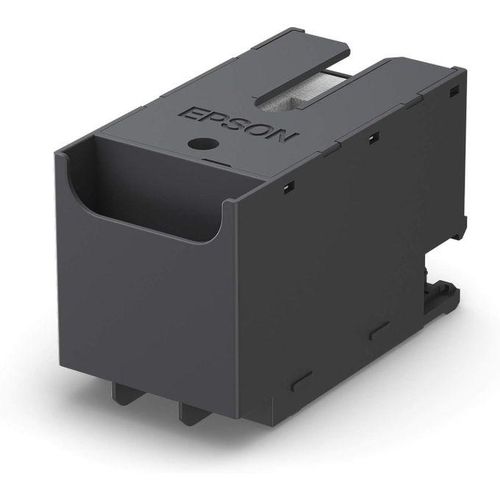
When it comes to maintaining the efficiency and longevity of your Epson inkjet printer, the Epson T6716 Maintenance Box is a crucial component for ensuring high-quality prints and smooth operation. Designed specifically for the Epson WF-M5299, WF-C5290, and WF-C5790 printers, the T6716 maintenance box plays a pivotal role in collecting excess ink during the printing process, which helps keep your printer clean and prevents ink leakage or overflow.
By choosing the Epson T6716 Maintenance Box (C13T671600), you ensure that your printer operates at its peak performance, reducing the risk of costly repairs and downtime. Whether you’re printing large volumes of documents for business use or handling personal projects, this maintenance box guarantees a smooth, hassle-free printing experience.
What Is the Epson T6716 Maintenance Box?
It is an essential accessory for select Epson printers. This maintenance box is specifically designed to fit the Epson WorkForce WF-M5299, WorkForce WF-C5290, and WorkForce WF-C5790 models. It functions by collecting unused ink that is purged during the printing process, ensuring that the printer’s internal components remain free from ink build-up. This efficient design allows your printer to maintain its optimal functionality for longer periods.
Why Choose the Epson T6716 Maintenance Box for Your Epson Printer?
When you invest in an Epson printer, ensuring its longevity and consistent performance is essential. It not only collects excess ink but also helps to maintain the cleanliness of your printer, which can be vital for preventing print quality issues. Without a properly functioning maintenance box, your printer could experience ink spillage, which may damage internal components and affect print output.
Here are some key reasons why this box is a must-have:
- Prevents Ink Overflow: The T6716 is designed to catch ink waste during the cleaning process, keeping the printer’s interior clean.
- Supports Longer Print Life: By reducing the risk of ink spills or build-up, this maintenance box helps your printer last longer.
- Easy Installation and Replacement: The maintenance box is simple to install, ensuring you won’t waste time during setup or replacement.
- Cost-Effective Solution: Instead of replacing expensive parts due to ink damage, a maintenance box is an affordable preventative measure to extend your printer’s life.
- Compatible with Multiple Printers: Ideal for the WF-M5299, WF-C5290, and WF-C5790, making it the perfect accessory for these models.
Features of the Epson T6716 Maintenance Box
It offers a range of features that make it an essential accessory for Epson WorkForce printer users:
- Compatible with Select Epson Printers: Specifically designed for the Epson WF-M5299, WF-C5290, and WF-C5790 printers, ensuring seamless integration with your device.
- Efficient Ink Waste Collection: The box efficiently collects excess ink, keeping your printer clean and your print quality consistent.
- Designed for High-Volume Printing: Perfect for offices or individuals who frequently print, the T6716 box is built to handle large quantities of ink waste.
- Durability and Reliability: Manufactured by Epson, the box is built to last, ensuring minimal maintenance and dependable performance.
- Eco-Friendly Solution: The Epson T6716 maintenance box is a sustainable option that reduces the environmental impact of ink waste disposal.
How to Install the Epson T6716 Maintenance Box
Installing it is quick and easy. Simply follow these steps:
- Locate the Maintenance Box Slot: On your Epson WF-M5299, WF-C5290, or WF-C5790 printer, find the designated maintenance box compartment.
- Remove the Old Box (if applicable): Gently remove the old maintenance box if one is already installed. Make sure to dispose of it according to local recycling guidelines.
- Insert the New T6716 Maintenance Box: Slide the T6716 maintenance box into the designated slot, ensuring it clicks into place.
- Close the Printer’s Cover: Once the box is securely installed, close the printer’s cover, and you’re ready to print again.
Benefits of Regular Maintenance with the Epson T6716 Maintenance Box
Maintaining your printer with a high-quality maintenance box like the Epson T6716 can have several advantages:
- Enhanced Printer Performance: Keep your printer running smoothly without any interruptions due to ink waste or spillage.
- Longer Printer Life: Regular maintenance prolongs the life of your printer and its internal components, saving you from premature repair costs.
- Improved Print Quality: A clean and well-maintained printer delivers more consistent and high-quality prints every time.
For additional maintenance tips and advice on how to optimize your Epson printer, check out this official Epson guide on printer maintenance.
Why Trust Aiconic Computers for Your Epson Accessories?
At Aiconic Computers, we understand the importance of high-quality printing accessories. We offer the Epson T6716 Maintenance Box and other premium products that ensure your Epson printer operates at its best. Visit us at Aiconic Computers for reliable printer accessories, excellent customer support, and fast shipping. Ensure your printer’s longevity with the right maintenance products from trusted brands like Epson.
You can also explore more about Epson printers and accessories through these high-authority websites.


 Boda delivery

 Boda delivery
 Countrywide delivery
 Warranty 1 year
 Free 48 Hrs Returns



Reviews
Clear filtersThere are no reviews yet.